
What key is watering mode in Leafy Corner?
Default C toggles watering mode. Rebind in settings if needed.

Leafy Corner watering guide: enter watering mode, read white and blue droplets, prevent rot from overwatering, use reduced watering, and plan your daily route.
Watering mode, droplet colours, rot from overwatering, and the reduced watering option.
~8 min read
Sponsored
Watering is the heartbeat of Leafy Corner, the cozy plant shop sim from Fireline Games (Fireline Games, Steam July 30, 2026, $9.99). Every in-game day you enter watering mode, read each plant's droplet meter, and keep moisture in the blue "perfect" band — white means thirsty, beyond blue risks rot. This Leafy Corner watering guide covers default controls, the droplet UI, overwater recovery, repotting resets, the reduced watering accessibility option, and shelf routes that survive customer rushes. Verified August 16, 2026 · Steam.
| Fact | Detail |
|---|---|
| Default water key | C toggles watering mode |
| Thirsty indicator | White droplet icon |
| Perfect moisture | Blue full droplet |
| Overwater result | Rot risk — stop at blue |
| Repot effect | Resets watering need |
| Accessibility | Reduced watering option in settings |
| Genre | Cozy Plant Shop Sim · Management · Relaxing |
| Species count | 100+ real houseplant species |
Press C (default binding) to toggle watering mode in Leafy Corner. Your reticle or interaction focus shifts to plants instead of customers and furniture. While active, eligible pots highlight and each shows the droplet meter — the only UI you need to trust for moisture. Rebind in settings if C conflicts with another cozy sim habit; the beginner guide assumes default.
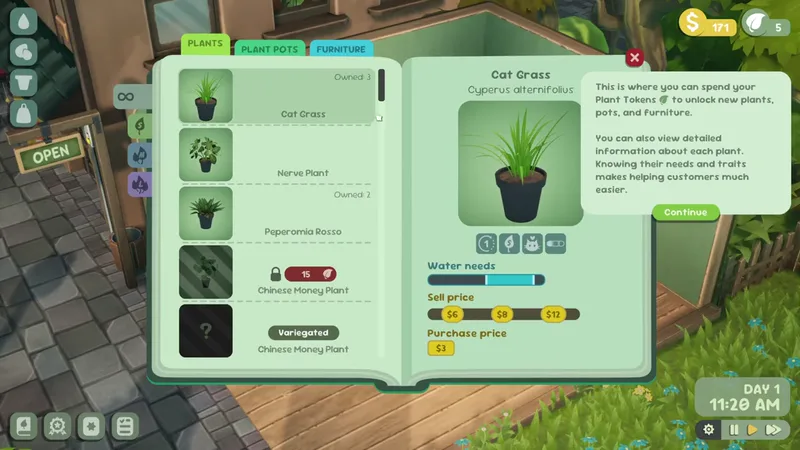
Outside watering mode you sell, decorate, propagate, and mark not for sale. Inside it, those actions are suppressed so you do not accidentally hand a customer a half-watered pothos. Train yourself: C on at day start, C off at open sign — the Leafy Corner watering guide rhythm every achievement hunter uses before chasing Green Giant or Blooming Beauty.
Plants mature over in-game days — price rises with size — but thirsty white pots pause that clock. A showroom full of white droplets is a silent revenue leak because customers want healthy trait matches, not wilted props.
The droplet UI is Leafy Corner's universal moisture language. Do not infer thirst from leaf texture alone during early growth — trust the icon above each pot.
| Droplet state | Color / fill | Gameplay effect |
|---|---|---|
| Thirsty | White / low fill | Growth slows or stops; plant looks dry |
| Perfect | Blue / full | Ideal growth and best sale condition |
| Overwatered | Beyond blue / flooded | Rot timer begins — see next section |
White droplet means the plant wants water now. In a busy Leafy Corner shop, white pots near the entrance are emergencies — customers see them first. Prioritize white → blue on counter-adjacent tables before back-shelf propagation stock.
Blue full droplet is the target band. Release watering input here. Perfect moisture keeps leaf-by-leaf growth advancing toward Medium and Large price tiers on the plants guide.
Holding water after blue pushes into overwater territory. The UI warns before rot sets fully — treat any "too wet" feedback like a red light. Succulents forgive slightly wider timing; humidity-loving species drink faster and punish overwater more visibly.
Matched by build plan, shared topics, and guide progression — not random related links.
Rot is Leafy Corner's penalty for ignoring the blue ceiling. Overwatered pots degrade — visually and mechanically — until you intervene. Rotten stock should never reach the counter; even correct trait tags on a rotting plant waste a customer interaction and reputation goodwill.
| Rot stage | What you see | What to do |
|---|---|---|
| Early overwater | Droplet past blue, slight wilt | Stop watering; let meter fall toward blue |
| Established rot | Clear decay on leaves / pot status | Remove from sale rotation; repot when ready |
| Showroom risk | Customer-facing rotten pot | Mark not for sale or discard per game prompts |
| Prevention | Release at blue | Best fix — no repot cost or lost growth days |
White thirsty and rotten both look unhappy but need opposite fixes. Check the droplet, not leaf color memory. This distinction is why the Leafy Corner watering guide stresses icons over vibes.
Rotten Large plants hurt Big Sale ($100+ single plant) pacing and waste days toward No Such Thing As Too Many (500 plants grown). Propagation shelves with chronic overwater rot burn tokens on species you never sell. Pair watering discipline with customers guide trait prep so you are not fixing pots during rushes.
Yes — repotting resets watering need in Leafy Corner. Moving a plant to a fresh pot clears the current moisture/rot state and gives a clean droplet baseline. Use repotting as recovery, not routine — pots and time cost money, and spam repotting slows achievement grinds.
Repot when rot established and you want to save the species, when you mis-watered a rare variegation, or when moving a plant to a better shelf and the game treats repot as a fresh start. Do not repot healthy blue pots "just because" — that is wasted cash.
Propagation creates a new plant and slows the parent — different tradeoff from repotting. For rot recovery, repot the sick pot; for stock expansion, propagate spares on the plants guide. Both interact with watering load — more pots means longer C mode laps.
Reduced watering is an accessibility and difficulty option in Leafy Corner settings. It widens the timing window for keeping droplets in blue without removing the minigame entirely — white still means thirsty, blue still means stop, rot still punishes reckless holding.
| Mode | Feel | Best for |
|---|---|---|
| Default watering | Tighter timing on fill rate | Players who want light challenge |
| Reduced watering | Forgiving fill / decay curves | Cozy-only pacing, large shops, propagation farms |
| Either mode | Droplet colors unchanged | Demo practice — see demo guide |
Toggle reduced watering anytime in settings — no save scum required. Many players run reduced on back shelves and default on front showroom pots; if the game offers only global toggle, pick reduced until you can clear a lap without rot, then tighten.
You still enter C mode and still read white/blue. Reduced watering only helps Leafy Corner feel relaxing when 100+ real houseplant species worth of pots would otherwise feel like a job sim. Phone-order days on orders guide pair well with reduced mode because trait prep steals minutes from laps.
Route planning separates shops that open on time from shops that lose customers while you sprint to white droplets in the back corner. Layout is decoration and efficiency — Leafy Corner rewards pretty corners that are also one continuous loop.
Morning lap: every pot to blue before open sign. Evening lap: catch humidity-loving drain after customer hours. Midday touch-up optional unless you run accelerated days or large shops post-reputation guide expansion.
Retail endgame is not watering every species daily — it is watering every placed pot you intend to sell. Unlock discipline on plants guide matters more than raw catalog size. Token unlock without shelf space creates watering debt.
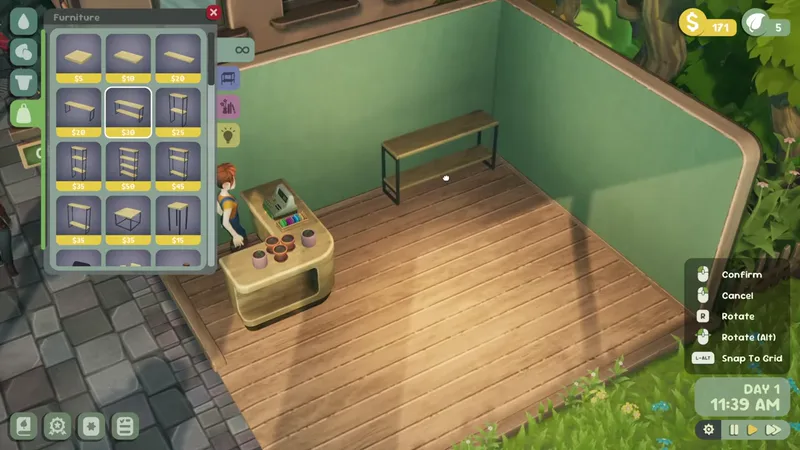
Always exit watering mode at blue on the last pot in your loop direction — clockwise or counter-clockwise, pick one and never swap. Muscle memory beats menu maps when Leafy Corner adds new tables after Room To Grow.
Default C toggles watering mode. Rebind in settings if needed.
Thirsty — water until the meter reaches blue perfect moisture.
Pushing past blue risks rot. Stop at blue; repot resets need if rot sets in.
Yes — repotting resets watering need and clears bad rot states at the cost of pots and time.
Settings option that widens timing windows while keeping white/blue/rot logic intact.
Growth pauses or slows on white droplets — water before expecting size tier price jumps.
Unhealthy pots fail sales even with correct traits — see customers guide.
Yes — free Steam demo includes full droplet UI. Demo guide.
August 16, 2026
Matched by build plan, shared topics, and guide progression — not random related links.